AutoEntry charges 3 credits per bank statement page. Here is what that does to your plan.
If most of your AutoEntry credits go to bank statements, you are paying 3 credits a page, and the plan you need is three times bigger than your page count suggests. At 500 statement pages a month that's AutoEntry's Diamond plan at $298. The same 500 pages fit inside ZeraBooks' converter plan at $79 a month billed annually, which covers 1,000 pages. (I'm Damin, I founded ZeraBooks. The AutoEntry numbers below come from AutoEntry's own pricing and help pages, checked November 5, 2026.)
If your AutoEntry bill keeps climbing and you haven't added clients, look at your statement pages first. That's where the multiplier lives.
How does AutoEntry count a bank statement?
AutoEntry's pricing page says a bank statement costs 3 credits per page. Its help article on uploading statements adds the detail that catches people: you're charged 3 credits for every page you upload, including blank pages, summary pages and notes pages. Duplicates are flagged, but the credits for a duplicate are still charged unless the statement is rejected.
So a 6-page business checking statement where page 5 is the bank's fee schedule and page 6 is "This page intentionally left blank" costs 18 credits, not 12.
Which AutoEntry plan does your page count land on?
AutoEntry's monthly plans in U.S. dollars (excluding VAT), from its pricing page:
| Plan | Credits a month | Price a month | Statement pages that fit (credits ÷ 3) |
|---|---|---|---|
| Bronze | 50 | $13 | 16 |
| Silver | 100 | $24 | 33 |
| Gold | 200 | $46 | 66 |
| Platinum | 500 | $103 | 166 |
| Diamond | 1,500 | $298 | 500 |
| Sapphire | 2,500 | $469 | 833 |
Now pick a realistic month and do the math:
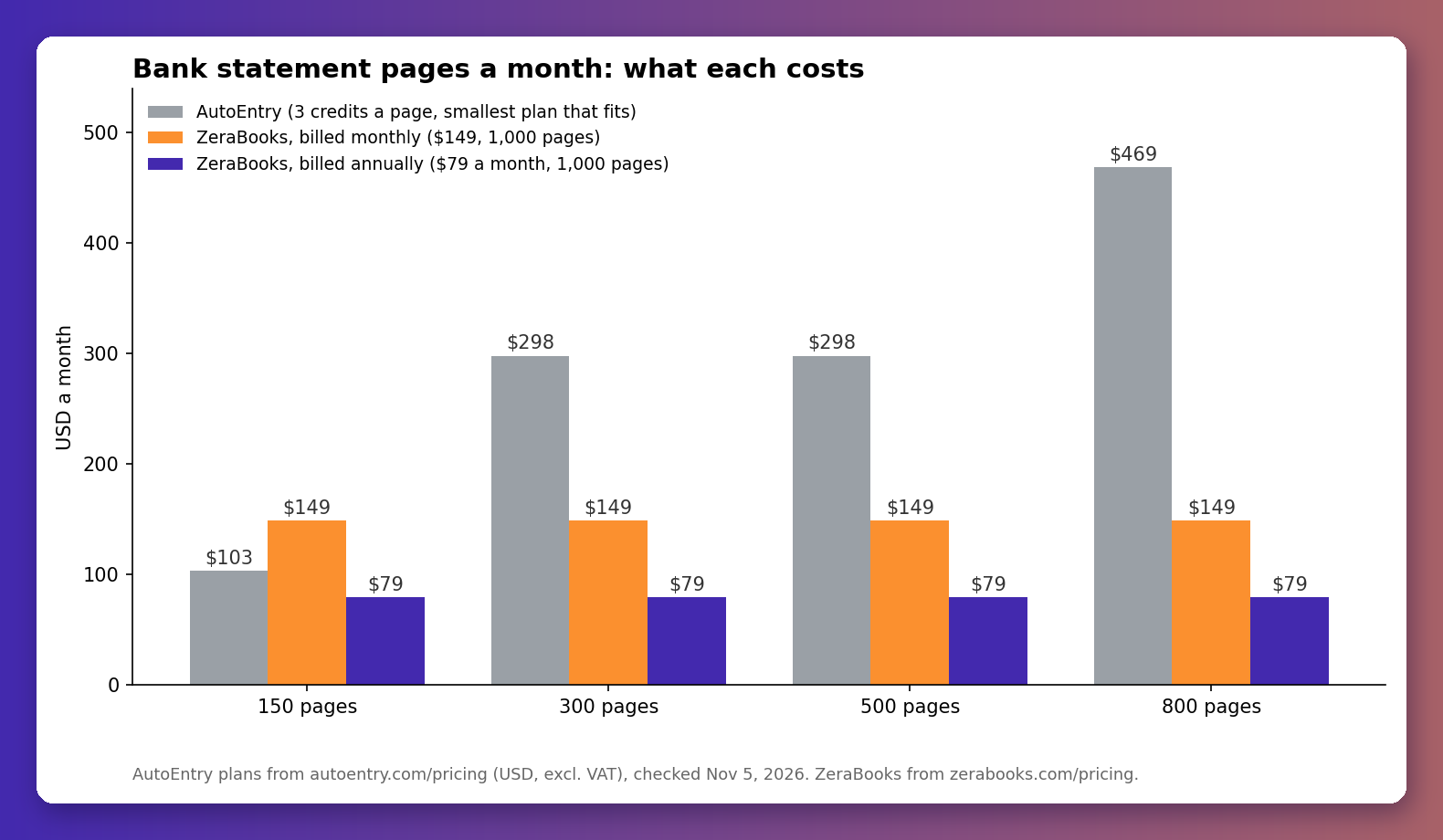
- 150 statement pages = 450 credits. Smallest plan that covers it: Platinum, $103.
- 300 statement pages = 900 credits. Too big for Platinum, so Diamond, $298.
- 500 statement pages = 1,500 credits. Still Diamond, $298.
- 800 statement pages = 2,400 credits. Sapphire, $469.
Unused credits roll over for 3 months, which helps a lumpy firm. It doesn't change the multiplier.
What do the same pages cost in ZeraBooks?
ZeraBooks prices the converter by page with no credit multiplier. One subscription is $79 a month billed annually ($948 a year) or $149 billed monthly, and it covers 1,000 pages a month. Bigger plans exist at 2,500 and 5,000 pages.
| Statement pages a month | AutoEntry plan | AutoEntry price | ZeraBooks price |
|---|---|---|---|
| 150 | Platinum | $103 | $79 (annual) or $149 (monthly) |
| 300 | Diamond | $298 | $79 (annual) or $149 (monthly) |
| 500 | Diamond | $298 | $79 (annual) or $149 (monthly) |
| 800 | Sapphire | $469 | $79 (annual) or $149 (monthly) |
On the annual plan ZeraBooks costs less at every volume in that table. Month to month, it costs less from 167 pages up, the point where Platinum runs out and AutoEntry jumps you to Diamond.
Is cheaper the actual reason to switch?
No. Cost gets people to look. What matters more is the proof.
AutoEntry captures account number, date, description, debit, credit, balance and cheque number, and lets you download Excel or CSV. What it doesn't say anywhere on its pages is whether it checks the extracted rows against the balances the bank printed. Maybe it does internally. I couldn't find it stated, so I won't claim it either way.
ZeraBooks does state it, because it's the whole product. Every statement is checked per account: opening balance plus every row has to equal the printed closing balance, to the cent, before the file is marked proven. Card statements get the same check the other way round, previous balance plus charges less payments equals the new balance. Here's a business credit card sample from our test set after ZeraBooks read it, with the proof line on top:
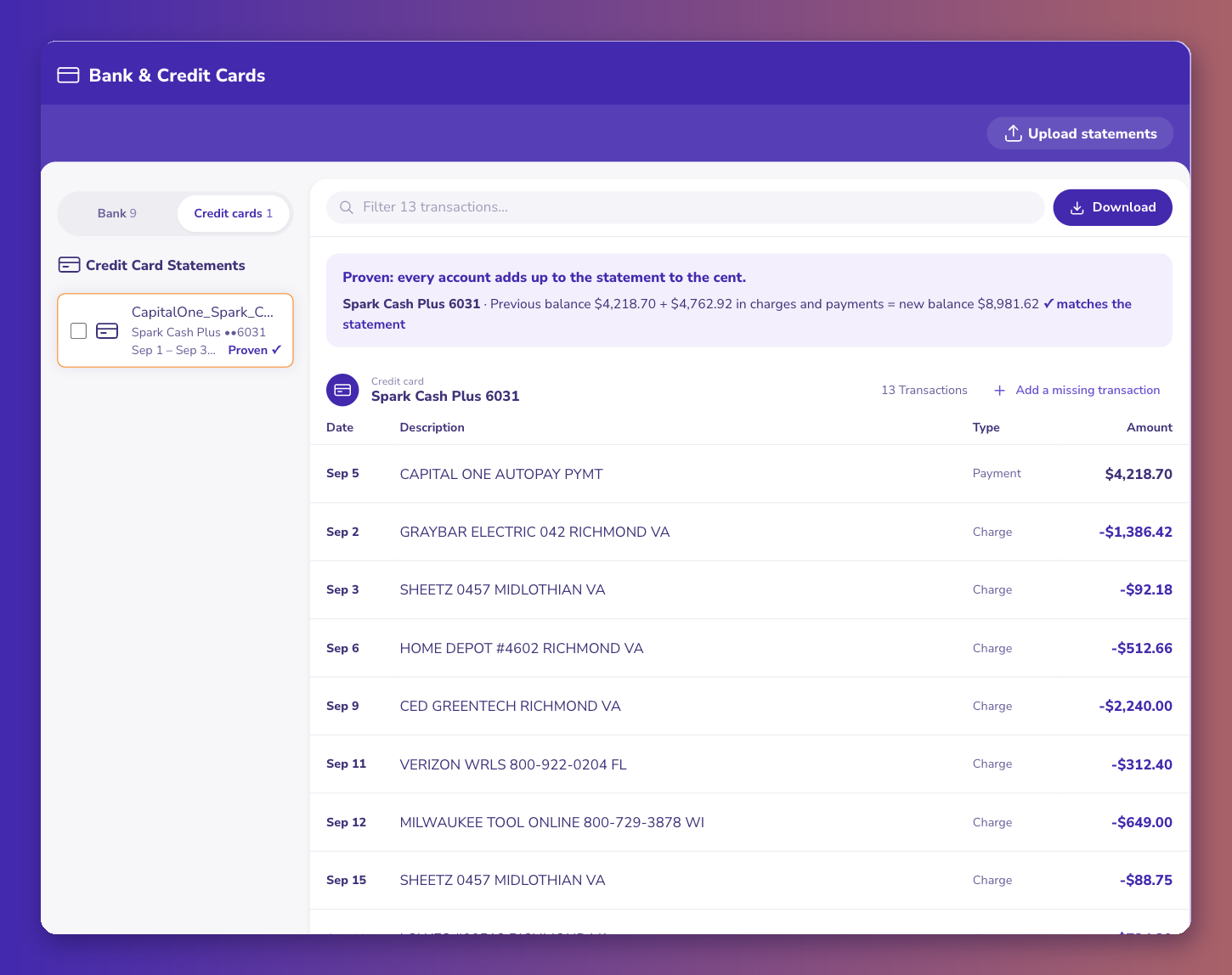
The sample is fictional and says so in its footer. The check is real, and it runs on every page you're paying for.
What do you keep and what do you give up?
You keep Excel and CSV downloads, and you get QuickBooks, Xero and Sage-ready CSV layouts too. ZeraBooks doesn't sync to QuickBooks or Xero directly and has no bank feeds; you import the CSV. If you use AutoEntry for receipts and bills, keep it for those. Move the statements.
The trial is different too. AutoEntry gives 25 free credits, which is 8 statement pages. ZeraBooks gives 7 days on the full plan (a card is taken at checkout and nothing is charged for 7 days), which is enough to run a client's whole year through it.
The full plan-by-volume breakdown, with what moves and what stays, is on the AutoEntry alternative page.
Count your pages before you count your clients. That's where the bill comes from.


Comments
Post a Comment